


Elements, arts cards and battle rules
Dragon Ball Legends mechanics
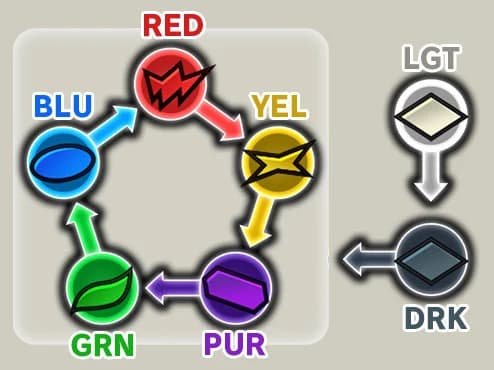
Elements
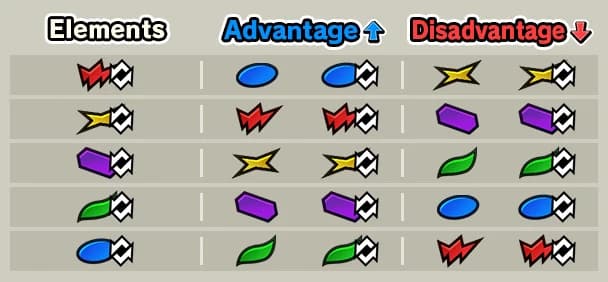
 REDStrong against:
  YEL +50%Weak against:
  BLU -50%
- YELStrong against:
 PUR +50%Weak against: RED -50%
 - PURStrong against:
 GRN +50%Weak against: YEL -50%
 - GRNStrong against: BLU +50%Weak against: PUR -50%
- BLUStrong against: RED +50%Weak against: GRN -50%
LEGENDS rarity units carry a Superior Element (RED+, YEL+ and so on): the same loop, but +75% with the advantage. DRK deals +50% to every basic and Superior Element, and LGT deals +50% to DRK, with no weakness of its own. Some abilities turn the loop round for a while (Reverse Element Factors), so a unit that was weak against an element becomes strong against it.
Battle Controls
9Attacking
Tap an Arts Card to attack with a skill that correspond to the card's type. Tap multiple Arts Cards successively to chain attacks together in a combo.
Tap the screen at close range to unleash a Tap Attack. Tap Attacks are quick and can be executed up to three times in a row.
Tap the screen at mid range to Tackle. Tackles are quick attacks that close the distance between you and the enemy.
Tap the screen at long range to unleash a Tap Shot. Tap Shots are singular Ki projectiles that are effective at restricting your enemy's movements.
Tap the screen while performing a Quick Dash to execute a Quick Attack. This allows you to attack while closing the distance between you and your opponent and is an effective way to surprise anyone who might be hanging back too much.
*Quick Attacks that hit during a combo will inflict less damage than normal.
Main Abilities
When the Ability Gauge is full, tap a character icon to use their Main Ability.
* Can only be used once per battle.
Using Ultimate skills
Some characters have Ultimate Skills. Use one by acquiring an Ultimate Technique card from a Main Ability's effect.
Moving
Slide your finger on the screen to move your character.
*Moving characters back will slightly reduce your Ki and Vanishing Gauge.
When not at long range, flick up to Boost and quickly close in on an opponent.
When at long range, flicking up will perform a Quick Dash, which will close the distance between you and your opponent instantly. You cannot take damage from Tap Shots while Quick Dashing.
*Flicking up after sidestepping or attacking with certain Arts will cause you to Boost, even at long range.
Flick down to backstep and get some distance.
Vanishing Step
Swipe left or right on the screen in time with the enemy's attack to avoid it using the Vanishing Step.
Using the Vanishing Step will deplete the Vanishing Gauge, but it recovers automatically over time.
Recovery is paused during certain actions, such as attacking.
The Vanishing Gauge will be restored to maximum value when you are hit by an enemy Arts attack or when you substitute characters.
* You will do a step without evasive effects if you don't have enough Vanishing Gauge.
Ki Charge
Hold down on the screen to rapidly restore your Ki Gauge.
Substituting Characters
Tap an ally character icon to control them. A fixed amount of time is needed before you can switch characters again.
Cover Change
When you are caught in an enemy combo, tap an ally character icon to have the standby character switch in and take the attacks instead.
This allows you to get yourself out of tight spots, save characters you don't want to be defeated, or swap in characters with high defenses to reduce the damage taken.
Cover Change cannot be used against Tap Actions
Tap Actions
Tap Actions are attacks that do not require Arts Cards or cost Ki. They are performed by tapping the screen.
There are two categories of Tap Actions.
Melee Tap Actions: Tap Attack, Tackle, Quick Attack
Ranged Tap Actions: Tap Shot
See "Attacks" in the help menu for more information on the strengths of each attack and how to use them.
Battle System
68Battle Rules
This game is an action RPG with card commands.
Fight with up to 3 characters from your party of 6 to defeat all the enemies.
If the time runs out, you will lose regardless of how much health you have left.
*Certain Story Battles may have special victory conditions.
*When the time runs out in PvP mode, the player who dealt the most damage to the other is the winner.
Elements
Characters each have an Element.
When a character with an elemental advantage attacks, they will deal more damage.
If they have an elemental disadvantage, they will deal less damage.
*However, Elements will not deal reduced damage against DRK.
Basic Elements
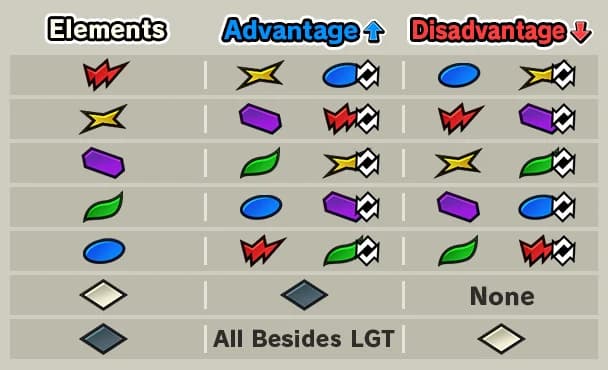
• RED: strong against YEL, weak against BLU
• YEL: strong against PUR, weak against RED
• PUR: strong against GRN, weak against YEL
• GRN: strong against BLU, weak against PUR
• BLU: strong against RED, weak against GRN
Special Elements
• DRK: strong against all Basic and Superior Elements, weak against LGT
• LGT: strong against DRK, no weaknesses
Reverse Element Factors
With Reverse Element Factors, your favorable Elements will be treated as unfavorable, and your unfavorable Elements as favorable.
Characters who possess this ability effect will have a Reverse mark next to their Element icon.
E.g., if an "Element: RED" character's Element factors are reversed, they will be strong against BLU and weak against YEL.
*Reverse Element Factors only affects basic Elements. It has no effect on the DRK and LGT Elements.
When two characters with reversed Elements face each other, whether or not your opponent's Element factors are reversed has no effect, and only their base Element will be taken into account.
E.g., if an "Element: RED" character's Element factors are reversed, they will be strong against BLU & Reverse BLU, and weak against YEL & Reverse YEL.
Superior Elements
"Superior Elements provide an even bigger damage boost compared to normal Elements when a character attacks with an elemental advantage. However, the amount of damage received from a disadvantaged Element is the same as normal Elements.
*Like with normal Elements, Superior Elements deal reduced damage when at an elemental disadvantage, except against DRK.
The relationship between the Elements is identical to that for normal Elements.
When text references a normal Element, such as for the target of an ability effect or in the equip conditions of Equipment, it will also apply to Superior Elements.
Superior Element Icons
• RED+

• YEL+

• PUR+

• GRN+

• BLU+

• DRK+

• LGT+

Arts Card Types
There are several kinds of Arts Card.
• Strike
Charges towards the enemy's position and attacks with a melee strike.
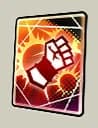
• Blast
Fires off Ki Blasts to attack from current position.
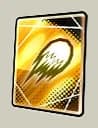
• Special Move
Attacks with a Special Move that's unique to each character.
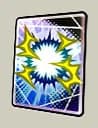
• Special
Activates various effects that are unique to each character.
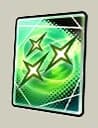
• Awakened
Activates a special attack.
(Only some characters have this card.)
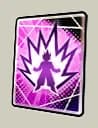
• Ultimate.
Activates an attack that's even more powerful than a Special Move.
(Only some characters have this card.)
Ki Gauge
Displays remaining Ki. Depleted when Arts Cards are used. Ki Gauge is restored over time.
Heavy Attacks
When a battle member uses an Arts attack, there is a chance it will become a Heavy Attack and deal increased damage.
*Attacks from guest or enemy characters (excluding in Tournament of Power and Guild Battles) cannot become Heavy Attacks.
When a Heavy Attack occurs, there is a chance it will become a Super Heavy Attack and deal even more damage than a normal Heavy Attack.
*Heavy/Super Heavy Attacks will not occur in PvP.
Improving a character's Heavy Attack capabilities through Arts Boosting will increase the chances that Heavy and Super Heavy Attacks occur.
When controlling one of your own characters in battle, their Heavy Attack capabilities will be displayed at the bottom of each Arts Card.
*They will not be displayed in battles where Heavy and Super Heavy Attacks do not occur.
Heavy and Super Heavy Attacks will not occur for the following attacks:
• Rising Rush
• All-Out Rush
• Rising Rush Z
Arts Boost Grade Requirements
Some Stories will have Arts Boost Grade Requirements. If a given boost does not exceed a specified grade requirement, then the corresponding Arts will deal reduced damage.
*If a given boost does not meet multiple requirements, then only the strongest damage reduction effect will be applied.
*Guest characters do not need to meet Arts Boost Grade Requirements.
If a Story has Arts Boost Grade Requirements, they can be checked in the Story's details.
The affected Arts Boosts, required grades, and damage reduction vary depending on the Story.
The following attacks will be affected by Arts Boost Grade Requirements:
• Rising Rush
• All-Out Rush
• Rising Rush Z
Enemy Distance
Short, medium, and long distances exist, and different attacks reach different distances. Check Arts for details.
Ranged Attacks
Ranged Attacks that show a Danger Zone by your feet cannot be evaded by Vanishing Steps. Move out of range to avoid them.
Dokabaki Impact
Dokabaki Impact occurs if equal power strikes collide. Tap to gain Ki and damage your enemy.
*The damage from this attack cannot cause the enemy to be defeated.
*Some Special Moves such as Kamehameha can also cause a Dokabaki Impact if they collide.
In this case, the damage can cause the enemy to be defeated.
Rising Rush
Tap an Arts Card with a Dragon Ball to fill Dragon Ball Slots. Get 7 and a button to trigger Rising Rush will appear.
Tap the button to unleash a powerful "Rising Rush" combo attack!
Only 1 kind of ability that manipulates the outcome of a Rising Rush wager will activate during a single Rising Rush.
Attribute Upgrades & Buff Effects
What is a "Buff Effect"?
An effect that grants a special state to a character.
Here are some example effects:
• Dragon Ball Protection
• Hand Protection
• Ki Protection
• One-Time Attribute Downgrade Nullification
• One-Time Abnormal Condition Nullification
• Special Cover Change Nullification
• Endurance Penetration
What is an "Attribute Upgrade"?
An effect that strengthens characters in specific ways.
Here are some example effects:
• Damage +10%
• Damage Guard +10%
• All Arts Costs -5
• Enemy Damage Guard Penetration +10%
Attribute Downgrades & Abnormal Conditions
Certain abilities can inflict Abnormal Conditions upon characters.
These effects will automatically end after a set number of counts.
List of Abnormal Conditions
Faint: Character becomes unresponsive
Poison: Character takes damage over time
Bleed: Character takes damage over time
Attribute Downgrades reduce a character's abilities in some way.
Here are some example effects:
• Damage Sustained +10%
• Health Restoration -10%
• All Arts Costs +10
• Special Move Arts Power -10%
Attack Types
When using Arts Cards to attack, there are three Attack Types: Strike Type, Blast Type, and Mixed Type.
Different stats are used to determine damage done by each type.
Even if two Arts are using the same parameters, their damage and cost may differ due to differences between the characters using them.
Attacks can also have four Attributes: Impact, Slice, Pierce, and Explode.
Battle Style
Each character has a
specific "Battle Style"
that gives them unique
perk.
Melee Type
-Excels in melee attack
Ranged Type
-Excels in ranged attack
Defense Type
-Excels in defending
Support Type:
-Excels in buff/debuff
Special Move
The Attack Type of Special Move differs based on the Skill.
Status Icon
A Status Icon will be displayed if your character has a status effect applied by a skill.
Status Icons fall into the following categories.
Some of the different Status Icons are shown in the images below.
• Attribute Upgrade
Character's attributes are strengthened
Status Icon
Effects

Strike Damage UP

Blast Damage UP

Inflicted Damage UP

Strike Arts Power UP

Blast Arts Power UP

Special Move Arts Power UP

Self-Destruct Damage DOWN

Self-Destruct Inflicted Damage UP

Element Factor UP

Critical Damage UP

Critical Rate UP

Critical UP

Strike Defense UP

Blast Defense UP

Sustained Damage CUT

Strike Cost DOWN

Blast Cost DOWN

Special Move Cost DOWN

Special Skill Cost DOWN

Ki Recovery UP

Health Restoration UP

Gauge Recovery UP

Poison Resistance UP

Bleed Resistance UP

Faint Resistance UP

Paralyze Resistance UP

Immobilize Resistance UP

Flash Resistance UP

Bleed Resistance UP

Poison Resistance UP

Faint Resistance UP

Paralyze Resistance UP

Immobilize Duration DOWN

Flash Duration DOWN

Impact Resistance UP

Slice Resistance UP

Pierce Resistance UP

Explode Resistance UP

Extra Strike Arts Effect: Faint

Penetrate: Cover Sust. Damage Cut

Special Move Damage UP

Card Drawing Speed UP

Arts Cost DOWN

Stand-By Count DOWN

Strike Arts Damage UP

Blast Arts Damage UP
• Attribute Downgrade
Character's attributes are weakened


Status Icon
Effects

Inflicted Damage DOWN

Sustained Damage UP

Strike Arts Power DOWN

Blast Arts Power DOWN

Special Move Arts Power DOWN

Self-Destruct Sustained Damage UP

Self-Destruct Damage DOWN

Element Factor DOWN

Critical Damage DOWN

Critical Rate DOWN

Critical DOWN

Strike Attack DOWN

Strike Defense DOWN

Blast Attack DOWN

Blast Defense DOWN

Strike Cost UP

Blast Cost UP

Special Move Cost UP

Special Skill Cost UP

Ki Recovery DOWN

Health Restoration DOWN

Gauge Recovery DOWN

Poison Resistance DOWN

Bleed Resistance DOWN

Faint Resistance DOWN

Paralyze Resistance DOWN

Immobilize Resistance DOWN

Flash Resistance DOWN

Bleed Resistance DOWN

Poison Resistance DOWN

Faint Resistance DOWN

Paralyze Resistance DOWN

Immobilize Duration UP

Flash Duration UP

Impact Resistance DOWN

Slice Resistance DOWN

Pierce Resistance DOWN

Explode Resistance DOWN

Special Move Damage DOWN

Card Drawing Speed DOWN

Arts Cost UP

Stand-By Count UP
• Abnormal Condition
Character has an abnormal condition applied (i.e. Faint, Poison, Bleed)
Status Icon
Effects

Immobilize

Bleed

Faint

Flash

Paralyze

Poison
• Buff
Character gains a status enhancing effect
Status Icon
Effects

Immunity to All Abnormal Conditions

Extra Blast Arts Effect: Reduce Ki

Extra Special Move Arts Effect: Reduce Ki

Extra Strike Arts Effect: Reduce Ki

Extra Normal Attack Effect: Absorb Ki

Extra Blast Arts Effect: Recover Ki

Extra Special Move Arts Effect: Recover Ki

Extra Strike Arts Effect: Recover Ki

Extra Normal Attack Effect: Absorb Health

Extra Blast Arts Effect: Restore Health

Extra Special Move Arts Effect: Restore Health

Extra Strike Arts Effect: Restore Health

Immunity to Unfavorable Elements

Restore Health Over Time

Immunity to All Attribute Downgrades
Armor & Armor Break
Armor:
This characteristic prevents actions from being interrupted even when hit by an attack.
However, you will still take damage from the attack when hit.
(Example) Strikes with the ""Blast Armor"" characteristic
These Strike skills will not be interruped
even if you are hit by an enemy's Blast skill.
*Certain skills will nullify armor characteristics.
Armor Break:
This can nullify the characteristic of certain skills and abilities that prevents actions from being interrupted even when hit by an attack.
Auto Mode
Battle will be conducted automatically when the Auto Mode button is switched on.
You are still able to input battle commands normally during Auto Mode and it will remain active afterwards.
Auto Mode can be turned off at any time during battle by tapping its button again.
*With the exception of Auto Match Rules, Auto Mode cannot be used in modes that involve other players, such as PvP and Hyperdimensional Co-Op.
Arts Card Draw Speed
There are six levels to Arts Card draw speed.
Normally, draw speed starts at level 3.
Level 6: Super
Level 5: Rapid 2
Level 4: Rapid 1
Level 3: Standard
Level 2: Slow
Level 1: Sluggish
Arts Card draw speed levels can be changed with Abilities that increase or decrease draw speed.
*Level 6 grants a draw speed faster than Level 5 only during combos.
Ki Attacks and Physical Attacks
Arts attacks that involve Ki techniques, such as energy blasts etc., are grouped as Ki Attacks.
Ki Attacks can be absorbed by "Ki Absorption" and other absorption-type actions.
Arts attacks that involve certain weapons or rocks are grouped as Physical Attacks.
Physical Attacks are unaffected by "Ki Absorption" and other absorption-type actions.
Unique Gauge
The Unique Gauge is a special resource that some characters use to activate exclusive effects.
There are various types of Unique Gauges that differ in how they are used and the activation conditions for their effects.

Attack Type
When Arts are used, the Unique Gauge will increase.

Sustained Damage Type
When characters are hit by enemy Arts attacks, the Unique Gauge will increase.

Charge Type
While the character is on the battlefield, the Unique Gauge will increase when charging Ki.

Ki Consumption Type
When Arts are used by allies, the Unique Gauge will increase according to the amount of Ki consumed.

Evade Type
While the character is slide moving or standing still, they will consume a certain amount of their Unique Gauge to activate Evade against certain enemy attacks.
Depending on the character, Evade might act as a counter and deal damage to the enemy.

Guard Type
While the character is slide moving or standing still, they will consume a certain amount of their Unique Gauge to activate a Guard Action against certain enemy attacks. Depending on the character, a counter may activate after guarding and deal damage to the enemy.

Counter Type
During specific actions, the character will consume a certain amount of their Unique Gauge to activate a counter against some enemy attacks.
Depending on the character, this counter may deal damage to the enemy.

Time Type
The Unique Gauge will increase over time.
Depending on the character, the Unique Gauge may stop charging or decrease in certain situations.

Switch Ability Type
Every time the character uses their Switch Ability, the Unique Gauge will increase.

Dragon Ball Type
The Unique Gauge will charge every time you obtain a Dragon Ball.

Release Type
The Unique Gauge will decrease over time. Specific effects will be active until the gauge reaches a certain point.

Evolve Type
Upon fulfilling the requirements, the level of the Unique Gauge will increase, causing it to evolve.
Unique Gauge-related abilities will power up in accordance with the level.

Confrontation Type
On every enemy character confrontation, the Unique Gauge will charge.
Check the individual characters' details screens for more information on the various effects, number of activations, and more.
Synchro Gauge

Synchro Gauges:
Certain Tag Characters have a "Synchro Gauge".
Tapping the gauge once it's full will activate special effects or actions.
Check the characters' details screen for more information about the gauge's effects and fill requirements.
Active Gauge

Active Gauges:
Certain characters have an Active Gauge.
Tapping the gauge once its activation conditions are fulfilled will activate a special action.
Check the characters' details screen for more information about the gauge's effects, activation conditions, and fill requirements.
Quick Battle
By checking "Quick Battle" before starting a battle,
you will be taken straight to the results screen.
In the ZENKAI Rush Battle, battle results are determined
according to the Elements, Health, Strike Attack, Blast Attack,
Strike Defense, and Blast Defense of your chosen characters.
Ability Effect Targets
If an ability effect target is not specified, it will apply to "self".
(Example)
On Hit
• Damage +10%
In this instance, when the attack hits, your character will receive a 10% boost to damage inflicted.
Damage Display
If the damage listed for Special Move or Ultimate Arts does not have a target, it will apply to the "enemy".
(Example)
Massive Damage (Impact)
In this case, massive damage will be dealt to the enemy.
Starter Ability
What is a "Starter Ability"?
An ability that activates right at the beginning of a battle.
Card Draw Ability Effects
What is an "Arts Card Draw Effect"?
An effect that allows you to draw cards from your deck.
*If a type is specified, like Strike or Blast, those cards will be drawn regardless of deck contents.
Sustained Damage Cut & Damage Guard
"Sustained Damage Cut" and "Damage Guard" are abilities with the same effects.
They reduce the amount of damage sustained from enemies.
Damage Guard Penetration
What is "Damage Guard Penetration"?
An effect that reduces the effectiveness of Damage Guard effects activated by an enemy.
Special Cover Change
What is a "Special Cover Change"?
An action that interrupts an enemy combo upon changing cover against a specific attack.
Some characters can follow-up with Arts after a Special Cover Change succeeds.
With some character exceptions, this can be activated when performing an assist.
Special Cover Change Nullification
What is "Special Cover Change Nullification"?
A Buff Effect that negates actions that an enemy activates when changing cover.
Combo-Breaking Action Nullification
What is "Combo-Breaking Action Nullification"?
A Buff Effect that negates enemy Autocounters, Evade actions, Guard Actions, and special actions that activate when changing cover.
Hand Protection
What is "Hand Protection"?
A Buff Effect that nullifies enemy "Card Destruction" effects.
Dragon Ball Protection
What is "Dragon Ball Protection"?
A Buff Effect that nullifies enemy effects that reduce the number of Dragon Balls you possess.
Ki Protection
What is "Ki Protection"?
A Buff Effect that nullifies enemy "Ki Reduction" effects.
Substitution Count Shortening on Switch
What is "Substitution Count Shortening on Switch"?
An Attribute Upgrade that reduces a character's cooldown time that occurs after switching out.
Substitution Count Shortening
What is "Substitution Count Shortening"?
An effect that immediately reduces a standby character's cooldown time before being allowed to switch in.
Substitution Count Infliction on Switch
What is "Substitution Count Infliction on Switch"?
An Attribute Downgrade that lengthens a character's cooldown time that occurs after switching out.
Substitution Count Infliction
What is "Substitution Count Infliction"?
An effect that immediately lengthens a standby character's cooldown time before being allowed to switch in.
Dragon Ball Stealing
What is "Dragon Ball Stealing"?
An ability that, in addition to reducing the number of Dragon Balls your enemy possesses, will increase your own.
*You cannot steal more Dragon Balls than your enemy possesses.
*If this ability is activated while you already have 7 Dragon Balls, it will have no effect.
Sealing
What is "Sealing"?
An ability that prevents the use of a certain card, card slot, the Main Ability, or Rising Rush.
The sealed target cannot be used for a certain amount of time.
Also, only 1 card slot can be sealed at any given time.
Certain seal effects will be displayed in the Status Icons for the enemy team.
The following icons can appear.
*Only a portion of the various icons are shown.
*These icons are not displayed in certain game modes.
Status Icons
Effect

Main Ability Seal

Rising Rush Seal
Seal Removal
What is "Seal Removal"?
An ability that undoes a seal caused by an ability effect.
*Character seals cannot be removed.
Character Sealing & Temporary Sealing
Character sealing is an ability possessed by certain characters that seals an enemy to standby, preventing them from switching in.
This sealed status is known as "character-sealed".
It is removed when the character who performed the seal is defeated or when the sealed character is the only character remaining.
Temporary sealing is an ability possessed by certain characters that seals an enemy to standby for a certain number of timer counts, preventing them from switching in.
This sealed status is known as "temporarily sealed".
It is removed when the requisite timer counts have elapsed and the character is brought onto the battlefield, or when the character becomes the last one remaining.
Combo-Breaking Actions and other special actions that occur when entering the battlefield do not activate when the seal is removed.
Furthermore, if an enemy is currently character-sealing a target, they cannot be temporarily sealed.
Whether character-sealed or temporarily sealed, sealed characters are not treated as defeated and will still be affected by abilities that target allies or all enemies.
If the enemy party already has a sealed character, a character seal or temporary seal will not activate.
For activation conditions and other detailed information on sealing, please check the character details.
Endurance
What is "Endurance"?
An ability where, upon your health reaching 0, one time only, you will recover health and not be defeated.
Nullify Endurance
What is "Nullify Endurance"?
A Buff Effect that nullifies an enemy's Endurance.
Revive・Revive Disruption
What is "Revive"?
Revive is an ability that allows some characters to revive with a certain amount of health when their health reaches 0.
*Most health restoration effects that activate at the same time as Revive will be nullified.
*In some cases, this effect will not be activated by an enemy's Self-Destruct attack. Please see the specific character's details screen.
What is "Revive Disruption"?
Revive Disruption is an ability that activates when a character on the battlefield causes an enemy character with a "Revives when health reaches 0" effect to revive.
Succession
What is "Succession"?
Succession is an ability that certain Tag Characters have. When the character's health reaches 0, it will change to a specific character with a set amount of health.
Certain characters will also inflict damage when Succession activates.
*Most health restoration effects that activate at the same time as Succession will be nullified.
*In some cases, this effect will not be activated by an enemy's Self-Destruct attack. Please see the specific character's details screen.
*This effect will not activate in Hyperdimensional Co-Op or Full Power Battle.
*Damage inflicted by Succession cannot cause an enemy to be defeated.
Indestructible/Indestructible State
What is "Indestructible"?
An ability that grants a "cannot be defeated" effect to self.
This effect persists until the end of an enemy's combo.
What is "Indestructible State"?
An ability that grants a "cannot be defeated" effect to self while certain requirements are fulfilled.
*This effect will be cancelled automatically when the requirements are no longer fulfilled.
Comeback
What is "Comeback"?
Comeback is an ability that allows a character to remain undefeated when their health reaches 0. The enemy's combo will be interrupted, and the character will revive.
*This effect will not activate in Hyperdimensional Co-Op or Full Power Battle.
*Most health restoration effects that activate at the same time as Comeback will be nullified.
*In some cases, this effect will not be activated by an enemy's Self-Destruct attack. Please see the specific character's details screen.
KO Guard
What is "KO Guard"?
An ability that prevents an ally from being defeated one time only.
If you receive an attack that would cause you to be defeated, the enemy's combo will be interrupted, and you will revive without being defeated.
When another battle member receives an attack that would cause them to be defeated, you will prevent that defeat and switch in.
However, KO Guard will not activate under the following conditions:
• If the ally has activated Indestructible, Endurance, Comeback, or other similar ability.
• If the ally has become defeated by using Self-Destruct.
• If the ally and enemy are defeated simultaneously through an exchange of wide-range Special Move Arts.
*When KO Guard is being activated, only the character's own health recovery effects will be applied.
*Most health restoration effects that activate at the same time as KO Guard will be nullified.
*In some cases, this effect will not activate upon an enemy's Self-Destruct attack. Please see the specific character's details screen.
*This effect will not activate in Hyperdimensional Co-Op or Full Power Battle.
Final Counter
What is a "Final Counter"?
An ability that allows a character to deal damage to the enemy upon being defeated if there are other ally battle members remaining.
*Damage from these attacks cannot cause enemies to be defeated.
*This effect will not activate in Hyperdimensional Co-Op or Full Power Battle.
*This effect will not be activated by an enemy's Self-Destruct attack.
Summon Backup
What is "Summon Backup"?
An ability that lets you summon a specific character as backup, and then battle as that character.
The backup character has its own Tags and stats separate from the summoning character.
If the backup character meets the Tag, Episode, or Character requirements for a piece of Equipment, then the summoning character will be able to use it.
Z Abilities and Zenkai Abilities that apply for either character's Tags will be applied to both characters.
Also, if any allies or enemies have abilities that reference how many of a certain character there are or whether certain characters are in either party, only the character that is currently active will be referenced. Characters that are not active will have no effect on these abilities.
Switch Attack
What is a "Switch Attack"?
An ability that allows a character to switch in and deal damage to the enemy after another ally lands a Strike or Blast Arts by tapping the character's icon during an active combo.
*Cover Changes cannot be performed against this attack.
*This attack cannot be performed after an ally's counter.
*This attack cannot cause the enemy to be defeated.
*This attack cannot be performed in Hyperdimensional Co-Op or Full Power Battle.
Anti-Cover Change Attack
What is an "Anti-Cover Change Attack"?
An ability that nullifies an enemy's Special Cover Change when they attempt to cover change against your Strike or Blast Arts. Damage will be dealt to both the incoming and the outgoing characters.
After dealing damage, this ability can combo into certain Arts against the incoming character.
*Damage from this attack cannot cause enemies to be defeated.
*This attack cannot be performed in Hyperdimensional Co-Op or Full Power Battle.
RR Disrupt
What is "RR Disrupt"?
RR Disrupt is a special ability where a character can stop an enemy's Rising Rush if you lose the wager while that character is on standby.
Certain characters may also deal damage after stopping a Rising Rush.
*Damage from this attack cannot cause enemies to be defeated.
*This ability will not activate in Hyperdimensional Co-Op or Full Power Battle.
Arts Action
Some characters have Arts Actions, which are additional inputs that are shown on screen during certain Arts.
Performing the displayed inputs correctly will change the effects of the Arts.
Check a character's details screen for more information on the inputs required.
Autocounter Types
Type "A"
An Autocounter will activate against certain enemy attacks while in the following states.
Relevant States
• Slide moving or standing still
• Sidestepping to the left or right
• Receiving an attack
*Excludes Abnormal Conditions and special states caused by certain Arts.
Type "B"
An Autocounter will activate against certain enemy attacks while in the following states.
Relevant States
• Slide moving or standing still
• Sidestepping to the left or right
• Receiving an attack
• Changing cover
*Excludes Abnormal Conditions and special states caused by certain Arts.
*Autocounter will not activate when changing cover if an ability effect is preventing the character from performing special actions that activate when changing cover.
Certain characters may also inflict damage on the enemy when performing an Autocounter.
*Damage from this attack cannot cause the enemy to be defeated.
Type "C"
An Autocounter will activate against certain enemy attacks while in the following states.
Relevant States
• Standing still
• Attacking, moving, or charging Ki
• Receiving an attack
• After switching
• Changing cover or during assists
*If the character's Unique Gauge is full when changing cover or during assists, this Autocounter will be given priority.
*Excludes Abnormal Conditions and special states caused by certain Arts.
Type "D"
An Autocounter will activate against certain enemy attacks while in the following states.
Relevant States
• Standing still
• Attacking, moving, or charging Ki
• Receiving an attack
*Excludes Abnormal Conditions and special states caused by certain Arts.
Guard Action Types
Type A
Guard Actions activate against certain enemy attacks while the character is slide moving or standing still.
Guard Actions will not activate in the following circumstances:
• The character has insufficient Unique Gauge
• The character has just performed a sidestep, attack, or similar action and cannot yet act again
The character will also perform a counter after guarding against certain attacks and deal damage to the enemy.
*Damage from this attack cannot cause the enemy to be defeated.
Type B
Guard Actions activate against certain enemy attacks while the character is slide moving, standing still, or after switching (but not when changing cover).
The character receives damage while guarding and will be defeated if their health reaches 0.
Additionally, Abnormal Conditions are nullified during Guard Actions.
Guard Actions will not activate in the following circumstances:
• The character has insufficient Unique Gauge
• The character has just performed a sidestep, attack, or similar action and cannot yet act again
The character will also perform a counter after guarding against certain attacks and deal damage to the enemy.
*Damage from this attack cannot cause the enemy to be defeated.
Evade Action Types
Type A
Evade Actions activate against certain enemy attacks while the character is slide moving or standing still.
Evade Actions will not activate in the following circumstances:
• The character has insufficient Unique Gauge
• The character has just performed a sidestep, attack, or similar action and cannot yet act again
Type B
Evade Actions activate against certain enemy attacks while the character is slide moving or standing still.
Evade Actions will not activate in the following circumstances:
• The character has insufficient Unique Gauge
• The character has just performed a sidestep, attack, or similar action and cannot yet act again
The character will also perform a counter after evading certain attacks and deal damage to the enemy.
*Damage from this attack cannot cause the enemy to be defeated.
Nullify wide-range Special Arts
What is "Nullify wide-range Special Arts"
Wide-Range Special Arts Nullification is an effect that nullifies an enemy's wide-range Special Arts attack while in one of the following states:
• Slide moving or standing still
• Sidestepping to the left or right
• Receiving an attack
*Excludes Abnormal Conditions and special states caused by certain Arts.
*Excludes Cover Changes.
Damage to Standby Members
What is "standby damage"?
Certain attacks will deal a fixed percentage of the damage they deal to characters on standby as "standby damage".
*Damage from these attacks cannot cause standby members to be defeated.
*Damage from these attacks will not activate abilities of standby members that activate when hit by an attack.
Special Dokabaki Impact Animations
Special Dokabaki Impact Animations are special animations that play when certain characters activate a Dokabaki Impact against a specific character.
*A given animation will only activate once per battle for each pair.
*They will not activate for Dokabaki Impacts caused by the collision of certain Special Move Arts, such as Kamehamehas.
Healing Limit
"Healing Limits" are effects that put a ceiling on the amount of health that can be recovered based on a character's maximum health. With some exceptions, when a character's healing has been limited, they will not be able to recover health beyond the limit.
However, Healing Limits will not apply to the following:
• Health from Revival
• Recovery from Comeback
• Health from Succession
• Recovery from KO Guard
• Health restored by supporters
• Health restoration marked as "fixed"
• Health from breaking an enemy NPC
KO Prevention Nullification
What is "KO Prevention Nullification"?
A Buff Effect that nullifies enemy "cannot be defeated" effects.
"Cannot be defeated" effects refer to the following:
• Endurance
• Revive
• Indestructible
• Indestructible State
• Comeback
• Succession
• KO Guard
*When a "cannot be defeated" effect other than Endurance is nullified, most enemy abilities that would activate alongside the effect are also nullified.
RR Defeat Nullification
What is "RR Defeat Nullification"?
RR Defeat Nullification is an ability that allows a character to deal damage to the enemy instead of receiving a counterattack when they lose the wager for a Rising Rush that they activated and landed.
If a supporter with an effect that turns a Rising Rush loss into a win has been chosen, the battle character's RR Defeat Nullification will take precedence, and activations of the supporter's effect will not be consumed.
Icon Help
1Icon Help
The Tag icon indicates a Character Tag.
Either of the following may be used within character details to reference Character Tags:
• "Tag: Lineage of Evil"
• Lineage of Evil
Ability glossary
57Elements
Characters each have an Element.
When a character with an elemental advantage attacks, they will deal more damage.
If they have an elemental disadvantage, they will deal less damage.
*However, Elements will not deal reduced damage against DRK.
Basic Elements
• RED: strong against YEL, weak against BLU
• YEL: strong against PUR, weak against RED
• PUR: strong against GRN, weak against YEL
• GRN: strong against BLU, weak against PUR
• BLU: strong against RED, weak against GRN
Special Elements
• DRK: strong against all Basic and Superior Elements, weak against LGT
• LGT: strong against DRK, no weaknesses
Attribute Downgrades & Abnormal Conditions
Certain abilities can inflict Abnormal Conditions upon characters.
These effects will automatically end after a set number of counts.
List of Abnormal Conditions
Faint: Character becomes unresponsive
Poison: Character takes damage over time
Bleed: Character takes damage over time
Attribute Downgrades reduce a character's abilities in some way.
Here are some example effects:
• Damage Sustained +10%
• Health Restoration -10%
• All Arts Costs +10
• Special Move Arts Power -10%
Armor & Armor Break
Armor:
This characteristic prevents actions from being interrupted even when hit by an attack.
However, you will still take damage from the attack when hit.
(Example) Strikes with the ""Blast Armor"" characteristic
These Strike skills will not be interruped
even if you are hit by an enemy's Blast skill.
*Certain skills will nullify armor characteristics.
Armor Break:
This can nullify the characteristic of certain skills and abilities that prevents actions from being interrupted even when hit by an attack.
Arts Card Draw Speed
There are six levels to the Arts Card Draw Speed.
Normally Draw Speed starts at level 3.
Level 6: Super
Level 5: Rapid 2
Level 4: Rapid 1
Level 3: Standard
Level 2: Slow
Level 1: Sluggish
Arts Card Draw Speed levels can be changed with Abilities that increase or decrease the Draw Speed.
Unique Gauge
The Unique Gauge is a special resource that some characters use to activate exclusive effects.
There are various types of Unique Gauges that differ in how they are used and the activation conditions for their effects.
Attack Type
When Arts are used, the Unique Gauge will increase.
Sustained Damage Type
When characters are hit by enemy Arts attacks, the Unique Gauge will increase.
Charge Type
While the character is on the battlefield, the Unique Gauge will increase when charging Ki.
Evade Type
While the character is slide moving or standing still, they will consume a certain amount of their Unique Gauge to activate Evade against certain enemy attacks.
Depending on the character, Evade might act as a counter and deal damage to the enemy.
Counter Type
During specific actions, the character will consume a certain amount of their Unique Gauge to activate a counter against some enemy attacks.
Depending on the character, this counter may deal damage to the enemy.
Time Type
The Unique Gauge will increase over time.
Depending on the character, the Unique Gauge may stop charging or decrease in certain situations.
Switch Ability Type
Every time the character uses their Switch Ability, the Unique Gauge will increase.
Dragon Ball Type
The Unique Gauge will charge every time you obtain a Dragon Ball.
Release Type
The Unique Gauge will decrease over time. Specific effects will be active until the gauge reaches a certain point.
Evolve Type
Upon fulfilling the requirements, the level of the Unique Gauge will increase, causing it to evolve.
Unique Gauge-related abilities will power up in accordance with the level.
Ki Consumption Type
When Arts are used by allies, the Unique Gauge will increase according to the amount of Ki consumed.
Check the individual characters' details screens for more information on the various effects, number of activations, and more.
Revive・Revive Disruption
Revive is an ability that allows some characters to revive with a certain amount of health when their health reaches 0.
Revive Disruption is an ability that activates when a character on the battlefield causes an enemy character with a "Revives when health reaches 0" effect to revive.
Reverse Element Factors
With Reverse Element Factors, your favorable Elements will be treated as unfavorable, and your unfavorable Elements as favorable.
Characters who possess this ability effect will have a Reverse mark next to their Element icon.
E.g., if an "Element: RED" character's Element factors are reversed, they will be strong against BLU and weak against YEL.
*Reverse Element Factors only affects basic Elements. It has no effect on the DRK and LGT Elements.
When two characters with reversed Elements face each other, whether or not your opponent's Element factors are reversed has no effect, and only their base Element will be taken into account.
E.g., if an "Element: RED" character's Element factors are reversed, they will be strong against BLU & Reverse BLU, and weak against YEL & Reverse YEL.
RR Disrupt
What is "RR Disrupt"?
RR Disrupt is a special ability where a character can stop an enemy's Rising Rush if you lose the wager while that character is on standby.
Certain characters may also deal damage after stopping a Rising Rush.
*Damage from this attack cannot cause enemies to be defeated.
*This ability will not activate in Hyperdimensional Co-Op or Full Power Battle.
Character Sealing & Temporary Sealing
Character sealing is an ability possessed by certain characters that seals an enemy to standby, preventing them from switching in.
This sealed status is known as "character-sealed".
It is removed when the character who performed the seal is defeated or when the sealed character is the only character remaining.
Temporary sealing is an ability possessed by certain characters that seals an enemy to standby for a certain number of timer counts, preventing them from switching in.
This sealed status is known as "temporarily sealed".
It is removed when the requisite timer counts have elapsed and the character is brought onto the battlefield, or when the character becomes the last one remaining.
Combo-Breaking Actions and other special actions that occur when entering the battlefield do not activate when the seal is removed.
Furthermore, if an enemy is currently character-sealing a target, they cannot be temporarily sealed.
Whether character-sealed or temporarily sealed, sealed characters are not treated as defeated and will still be affected by abilities that target allies or all enemies.
If the enemy party already has a sealed character, a character seal or temporary seal will not activate.
For activation conditions and other detailed information on sealing, please check the character details.
Synchro Gauge
Synchro Gauges:
Certain Tag Characters have a "Synchro Gauge".
Tapping the gauge once it's full will activate special effects or actions.
Check the characters' details screen for more information about the gauge's effects and fill requirements.
Active Gauge
Active Gauges:
Certain characters have an Active Gauge.
Tapping the gauge once its activation conditions are fulfilled will activate a special action.
Check the characters' details screen for more information about the gauge's effects, activation conditions, and fill requirements.
Succession
What is "Succession"?
Succession is an ability that certain Tag Characters have. When the character's health reaches 0, it will change to a specific character with a set amount of health.
Certain characters will also inflict damage when Succession activates.
*In some cases, this effect will not be activated by an enemy's Self-Destruct attack. Please see the specific character's details screen.
*This effect will not activate in Hyperdimensional Co-Op or Full Power Battle.
*Damage inflicted by Succession cannot cause an enemy to be defeated.
Ability Effect Targets
If an ability effect target is not specified, it will apply to "self".
(Example)
On Hit
• Damage +10%
In this instance, when the attack hits, your character will receive a 10% boost to damage inflicted.
Damage Display
If the damage listed for Special Move or Ultimate Arts does not have a target, it will apply to the "enemy".
(Example)
Massive Damage (Impact)
In this case, massive damage will be dealt to the enemy.
Starter Ability
What is a "Starter Ability"?
An ability that activates right at the beginning of a battle.
Card Draw Ability Effects
What is an "Arts Card Draw Effect"?
An effect that allows you to draw cards from your deck.
*If a type is specified, like Strike or Blast, those cards will be drawn regardless of deck contents.
Attribute Upgrades & Buff Effects
What is a "Buff Effect"?
An effect that grants a special state to a character.
Here are some example effects:
• Dragon Ball Protection
• Hand Protection
• Ki Protection
• One-Time Attribute Downgrade Nullification
• One-Time Abnormal Condition Nullification
• Special Cover Change Nullification
• Endurance Penetration
What is an "Attribute Upgrade"?
An effect that strengthens characters in specific ways.
Here are some example effects:
• Damage +10%
• Damage Guard +10%
• All Arts Costs -5
• Enemy Damage Guard Penetration +10%
Sustained Damage Cut & Damage Guard
"Sustained Damage Cut" and "Damage Guard" are abilities with the same effects.
They reduce the amount of damage sustained from enemies.
Damage Guard Penetration
What is "Damage Guard Penetration"?
An effect that reduces the effectiveness of Damage Guard effects activated by an enemy.
Endurance
What is "Endurance"?
An ability where, upon your health reaching 0, one time only, you will recover health and not be defeated.
Nullify Endurance
What is "Nullify Endurance"?
A Buff Effect that nullifies an enemy's Endurance.
Special Cover Change
What is a "Special Cover Change"?
An action that interrupts an enemy combo upon changing cover against a specific attack.
Some characters can follow-up with Arts after a Special Cover Change succeeds.
With some character exceptions, this can be activated when performing an assist.
Special Cover Change Nullification
What is "Special Cover Change Nullification"?
A Buff Effect that negates actions that an enemy activates when changing cover.
Combo-Breaking Action Nullification
What is "Combo-Breaking Action Nullification"?
A Buff Effect that negates enemy Autocounters, Evade actions, and special actions that activate when changing cover.
Hand Protection
What is "Hand Protection"?
A Buff Effect that nullifies enemy "Card Destruction" effects.
Dragon Ball Protection
What is "Dragon Ball Protection"?
A Buff Effect that nullifies enemy effects that reduce the number of Dragon Balls you possess.
Ki Protection
What is "Ki Protection"?
A Buff Effect that nullifies enemy "Ki Reduction" effects.
Substitution Count Shortening on Switch
What is "Substitution Count Shortening on Switch"?
An Attribute Upgrade that reduces a character's cooldown time that occurs after switching out.
Substitution Count Shortening
What is "Substitution Count Shortening"?
An effect that immediately reduces a standby character's cooldown time before being allowed to switch in.
Substitution Count Infliction on Switch
What is "Substitution Count Infliction on Switch"?
An Attribute Downgrade that lengthens a character's cooldown time that occurs after switching out.
Substitution Count Infliction
What is "Substitution Count Infliction"?
An effect that immediately lengthens a standby character's cooldown time before being allowed to switch in.
Dragon Ball Stealing
What is "Dragon Ball Stealing"?
An ability that, in addition to reducing the number of Dragon Balls your enemy possesses, will increase your own.
*You cannot steal more Dragon Balls than your enemy possesses.
*If this ability is activated while you already have 7 Dragon Balls, it will have no effect.
Sealing
What is "Sealing"?
An ability that prevents the use of a certain card, card slot, the Main Ability, or Rising Rush.
The sealed target cannot be used for a certain amount of time.
Also, only 1 card slot can be sealed at any given time.
Seal Removal
What is "Seal Removal"?
An ability that undoes a seal caused by an ability effect.
*Character seals cannot be removed.
Indestructible/Indestructible State
What is "Indestructible"?
An ability that grants a "cannot be defeated" effect to self.
This effect persists until the end of an enemy's combo.
What is "Indestructible State"?
An ability that grants a "cannot be defeated" effect to self while certain requirements are fulfilled.
*This effect will be cancelled automatically when the requirements are no longer fulfilled.
Autocounter Types
Type "A"
An Autocounter will activate against certain enemy attacks while in the following states.
Relevant States
• Slide moving or standing still
• Sidestepping to the left or right
• Receiving an attack
*Excludes Abnormal Conditions and special states caused by certain Arts.
Type "B"
An Autocounter will activate against certain enemy attacks while in the following states.
Relevant States
• Slide moving or standing still
• Sidestepping to the left or right
• Receiving an attack
• Changing cover
*Excludes Abnormal Conditions and special states caused by certain Arts.
*Autocounter will not activate when changing cover if an ability effect is preventing the character from performing special actions that activate when changing cover.
Certain characters may also inflict damage on the enemy when performing an Autocounter.
*Damage from this attack cannot cause the enemy to be defeated.
Type "C"
An Autocounter will activate against certain enemy attacks while in the following states.
Relevant States
• Standing still
• Attacking, moving, or charging Ki
• Receiving an attack
• After switching
• Changing cover or during assists
*If the character's Unique Gauge is full when changing cover or during assists, this Autocounter will be given priority.
*Excludes Abnormal Conditions and special states caused by certain Arts.
Type "D"
An Autocounter will activate against certain enemy attacks while in the following states.
Relevant States
• Standing still
• Attacking, moving, or charging Ki
• Receiving an attack
*Excludes Abnormal Conditions and special states caused by certain Arts.
Evade Action Types
Type A
Evade Actions activate against certain enemy attacks while the character is slide moving or standing still.
Evade Actions will not activate in the following circumstances:
• The character has insufficient Unique Gauge
• The character has just performed a sidestep, attack, or similar action and cannot yet act again
Type B
Evade Actions activate against certain enemy attacks while the character is slide moving or standing still.
Evade Actions will not activate in the following circumstances:
• The character has insufficient Unique Gauge
• The character has just performed a sidestep, attack, or similar action and cannot yet act again
The character will also perform a counter after evading certain attacks and deal damage to the enemy.
*Damage from this attack cannot cause the enemy to be defeated.
Comeback
What is "Comeback"?
Comeback is an ability that allows a character to remain undefeated when their health reaches 0. The enemy's combo will be interrupted, and the character will revive.
*This effect will not activate in Hyperdimensional Co-Op or Full Power Battle.
*In some cases, this effect will not be activated by an enemy's Self-Destruct attack. Please see the specific character's details screen.
Damage to Standby Members
What is "standby damage"?
Certain attacks will deal a fixed percentage of the damage they deal to characters on standby as "standby damage".
*Damage from these attacks cannot cause standby members to be defeated.
*Damage from these attacks will not activate abilities of standby members that activate when hit by an attack.
Nullify wide-range Special Arts
What is "Nullify wide-range Special Arts"
Wide-Range Special Arts Nullification is an effect that nullifies an enemy's wide-range Special Arts attack while in one of the following states:
• Slide moving or standing still
• Sidestepping to the left or right
• Receiving an attack
*Excludes Abnormal Conditions and special states caused by certain Arts.
*Excludes Cover Changes.
KO Guard
What is "KO Guard"?
An ability that prevents an ally from being defeated one time only.
If you receive an attack that would cause you to be defeated, the enemy's combo will be interrupted, and you will revive without being defeated.
When another battle member receives an attack that would cause them to be defeated, you will prevent that defeat and switch in.
However, KO Guard will not activate under the following conditions:
• If the ally has activated Indestructible, Endurance, Comeback, or other similar ability.
• If the ally has become defeated by using Self-Destruct.
• If the ally and enemy are defeated simultaneously through an exchange of wide-range Special Move Arts.
*When KO Guard is being activated, only the character's own health recovery effects will be applied.
*In some cases, this effect will not activate upon an enemy's Self-Destruct attack. Please see the specific character's details screen.
*This effect will not activate in Hyperdimensional Co-Op or Full Power Battle.
Summon Backup
What is "Summon Backup"?
An ability that lets you summon a specific character as backup, and then battle as that character.
The backup character has its own Tags and stats separate from the summoning character.
If the backup character meets the Tag, Episode, or Character requirements for a piece of Equipment, then the summoning character will be able to use it.
Z Abilities and Zenkai Abilities that apply for either character's Tags will be applied to both characters.
Also, if any allies or enemies have abilities that reference how many of a certain character there are or whether certain characters are in either party, only the character that is currently active will be referenced. Characters that are not active will have no effect on these abilities.
Switch Attack
What is a "Switch Attack"?
An ability that allows a character to switch in and deal damage to the enemy after another ally lands a Strike or Blast Arts by tapping the character's icon during an active combo.
*Cover Changes cannot be performed against this attack.
*This attack cannot be performed after an ally's counter.
*This attack cannot cause the enemy to be defeated.
*This attack cannot be performed in Hyperdimensional Co-Op or Full Power Battle.
Final Counter
What is a "Final Counter"?
An ability that allows a character to deal damage to the enemy upon being defeated if there are other ally battle members remaining.
*Damage from these attacks cannot cause enemies to be defeated.
*This effect will not activate in Hyperdimensional Co-Op or Full Power Battle.
*This effect will not be activated by an enemy's Self-Destruct attack.
Anti-Cover Change Attack
What is an "Anti-Cover Change Attack"?
An ability that nullifies an enemy's Special Cover Change when they attempt to cover change against your Strike or Blast Arts. Damage will be dealt to both the incoming and the outgoing characters.
After dealing damage, this ability can combo into certain Arts against the incoming character.
*Damage from this attack cannot cause enemies to be defeated.
*This attack cannot be performed in Hyperdimensional Co-Op or Full Power Battle.
Superior Elements
"Superior Elements provide an even bigger damage boost compared to normal Elements when a character attacks with an elemental advantage. However, the amount of damage received from a disadvantaged Element is the same as normal Elements.
*Like with normal Elements, Superior Elements deal reduced damage when at an elemental disadvantage, except against DRK.
The relationship between the Elements is identical to that for normal Elements.
When text references a normal Element, such as for the target of an ability effect or in the equip conditions of Equipment, it will also apply to Superior Elements.
Superior Element Icons
• RED+
• YEL+
• PUR+
• GRN+
• BLU+
• DRK+
• LGT+
Healing Limit
"Healing Limits" are effects that put a ceiling on the amount of health that can be recovered based on a character's maximum health. With some exceptions, when a character's healing has been limited, they will not be able to recover health beyond the limit.
However, Healing Limits will not apply to the following:
• Health from Revival
• Recovery from Comeback
• Health from Succession
• Recovery from KO Guard
• Health restored by supporters
• Health restoration marked as "fixed"
• Health from breaking an enemy NPC
Special Dokabaki Impact Animations
Special Dokabaki Impact Animations are special animations that play when certain characters activate a Dokabaki Impact against a specific character.
*A given animation will only activate once per battle for each pair.
*They will not activate for Dokabaki Impacts caused by the collision of certain Special Move Arts, such as Kamehamehas.
Z Abilities
These are special abilities that are always active from the start of battle when a character is part of a party.
The effect of these abilities is enhanced when a character is Limit Broken to ★3/★6/★7+.
The effects of Z Abilities will be applied to all relevant party members, so try different combinations of character effects.
*Characters do not have to be deployed as battle members.
Assault Z Abilities
These are abilities that are only found on LEGENDS LIMITED or LEGEND characters.
Their effects are always active, but only if the character is selected as a battle member.
Any active effects will only be applied to up to three battle members including the character itself.
The effects of these abilities are enhanced when a character reaches Limit Break ★3, ★6, and ★7+.
*Assault Z Abilities only affect a character's regular stats.
They have no effect on ToP stats.
LEGEND Actions
LEGEND Actions are a type of battle action that can only be activated by LEGEND-rarity characters.
By using an Area Change Attack in a specific area, either the High Area or the Low Area, it will change into a LEGEND Action. After the attack lands, it can be comboed into certain Arts.
*The area a LEGEND Action can be activated in depends on the character. Please see the specific character's details screen.
ULTRA Abilities
These abilities can only be used by "Rarity: ULTRA" characters.
They will activate at the start of battle when these characters are included in a party.
For effects that are dependent upon support members, only up to 3 members will be taken into consideration.
*Supporters do not count as support members.
Icon Help
The Tag icon indicates a Character Tag.
Either of the following may be used within character details to reference Character Tags:
• "Tag: Lineage of Evil"
• Lineage of Evil
Character {icon:Chara}
The character icon indicates a battle character.
Either of the following may be used within character details to reference battle characters:
• "Character: Goku"
• Goku
Episode {icon:Epi}
The Episode icon indicates the Episode a character belongs to.
Either of the following may be used within character details to reference Episodes:
• "Episode: Saiyan Saga (Z)"
• Saiyan Saga (Z)
Blast Armor
Arts with Blast Armor will have an icon in the description indicating that characteristic.
Blast Nullification
Arts with Blast Nullification will have an arrow in the description indicating that characteristic.